
Download gContacts – Kontaktmanager, Telefonbuch, Android-App, Kontaktliste, Kontaktorganisator, Kontaktdatenbank, Kontakt-Backup, Kontaktsuche, Kontaktgruppe, Kontaktfreigabe, Kontaktimport, Kontaktexport
Übersicht
gContacts ist eine kostenlose Android-Anwendung, entwickelt von y.gphonebook, die als umfassendes Kontaktverwaltungs‑Tool für mobile Nutzer dienen soll. Die Software zielt darauf ab, das Standard‑Telefonbuch-Erlebnis zu verbessern, indem sie eine schlanke Funktionalität einführt, die auf Klarheit, Einfachheit und Benutzerfreundlichkeit ausgerichtet ist. Während die meisten Android‑Geräte ein integriertes Kontaktsystem besitzen, bietet gContacts eine dedizierte Alternative mit einer Reihe ergänzender Werkzeuge, die darauf abzielen, Zugänglichkeit und Organisation zu verbessern. Sie ist besonders geeignet für Personen, die ein großes Kontaktsvolumen verwalten oder erweiterte Organisationsfunktionen benötigen, die über die Grundfunktionen eines Telefonbuchs hinausgehen.
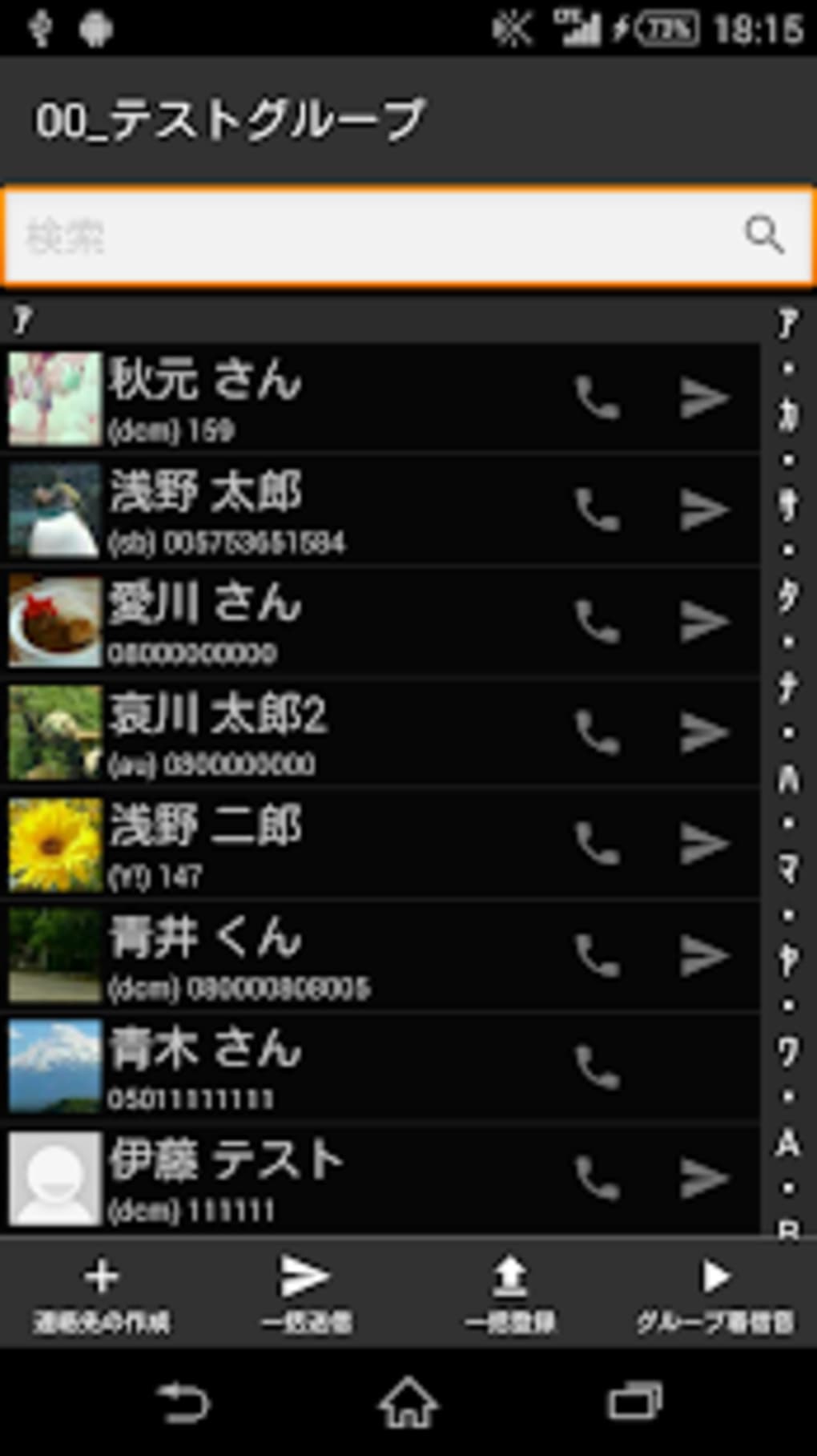
Die App unterstützt den schnellen Zugriff auf häufig genutzte Kontakte über eine Shortcut‑Schaltfläche, einen Funktions‑Wähler für Direktanrufe und ein leistungsstarkes Suchsystem, das es ermöglicht, Kontakte nach Name, Spitzname, Telefonnummer, E‑Mail‑Adresse oder Firmenname zu finden. Außerdem enthält sie ein Gruppen‑Management‑System, das es Nutzern erlaubt, Kontaktgruppen zu erstellen, zu starten und zu registrieren – nützlich für geschäftliche oder private Kommunikationsabläufe. Die Software integriert sich mit Bizcaroid, einem Kartenleser‑Tool, um Kontaktdaten von physischen Visitenkarten zu erfassen und so die Nutzung für Networking‑ und Berufsanwendungen zu erweitern.
Zusätzlich bietet gContacts Import‑ und Export‑Funktionen für Kontaktdaten, sodass Nutzer ihre Informationen sichern oder zwischen Geräten übertragen können. Funktionen wie Massen‑E‑Mail‑Unterstützung (TO, CC, BCC), ausgehende Präfix‑Einstellungen und anpassbare Layouts erweitern die Funktionalität weiter. Die App ist ideal für Fachleute, Vielkommunikatoren und Nutzer, die eine effizientere und organisiertere Verwaltung ihres digitalen Kontakt‑Ökosystems suchen.
Hauptfunktionen & Fähigkeiten
- Quick Contact Access: A dedicated shortcut button enables immediate access to frequently used contacts, reducing navigation time and improving workflow efficiency.
- Advanced Search Functionality: Users can search contacts using multiple criteria, including name, nickname, phone number, email, and company name, ensuring fast and accurate results.
- Contact Group Management: The app allows users to create, launch, and register contact groups, which can be used for targeted messaging or call distribution.
- Group Shelf Registration: This feature supports the storage and organization of multiple contact groups, enabling users to manage different sets of contacts for various purposes.
- Sortation Tool: A built-in sorting system helps users organize contacts based on custom criteria, improving readability and accessibility.
- QR Code Display: The app includes a display function for QR codes, facilitating easy sharing of contact information via scan-based exchange.
- Integration with Bizcaroid: Seamless compatibility with Bizcaroid allows users to import contact data directly from physical business cards, streamlining contact entry.
- Import and Export Functions: Users can back up contact data or transfer it between devices using robust import and export tools.
- Bulk Email Capabilities: Supports mass emailing with TO, CC, and BCC fields, useful for group communications or newsletters.
- Outgoing Prefix Settings: Allows users to set custom prefixes for outgoing calls, which can be helpful for international dialing or business branding.
- Customizable Layout: Offers a free layout design, enabling users to personalize the interface for improved usability and visual clarity.
These features collectively enhance the user experience by reducing friction in daily contact interactions. For example, a business professional can use the group feature to send a single email to a client team, while a personal user might leverage the search function to quickly find a contact by nickname. The integration with Bizcaroid is especially beneficial for networking events, where physical cards can be digitized on the spot.
Benutzeroberfläche, Arbeitsablauf & Leistung
The user interface of gContacts is designed with simplicity and clarity in mind, prioritizing intuitive navigation and visual organization. The layout appears to be structured around core functions—search, contact list, groups, and settings—ensuring that users can access essential tools without unnecessary steps. The app likely follows a tab-based or menu-driven navigation model, common in productivity tools, to maintain consistency and reduce cognitive load.
Workflow efficiency is enhanced by features such as the shortcut button for immediate contact access and the function dialer, which allows direct calling without opening the full contact list. The search function is likely implemented in real-time, enabling users to filter results as they type. The sortation tool and group shelf support logical organization, which may be particularly helpful for users managing multiple contact categories.
Performance details were not specified by the developer. However, given the app’s size of 12.5 MB, it is likely optimized for low resource consumption. The developer did not provide additional system requirements or performance metrics. General software behavior suggests that the app should operate smoothly on modern Android devices, though actual performance may vary based on device hardware and background processes.
Kompatibilität & Systemanforderungen
gContacts is designed for Android operating systems and is available as a desktop application, though it is intended for mobile use. The app is compatible with devices running Android, though specific version requirements were not listed. The installation size is 12.5 MB, indicating a lightweight footprint that should not significantly impact storage space.
Exact system requirements were not listed by the developer. Compatibility information is limited to the platform and size. Users should ensure their device meets general Android standards for app installation. The developer did not specify minimum CPU, RAM, or storage thresholds, nor did they provide information about support for older Android versions.
Vor- und Nachteile
Vorteile
- Free to download and use, with no in-app purchases or ads mentioned
- Lightweight at only 12.5 MB, suitable for devices with limited storage
- Advanced search across multiple contact fields (name, number, email, company)
- Supports contact group creation and management for organized communication
- Integration with Bizcaroid for business card scanning and data entry
- Import and export features for backup and cross-device transfer
- Customizable layout for personalized user experience
- Supports bulk email with TO, CC, and BCC fields
- Outgoing prefix functionality for international or branded calling
- QR code display for easy contact sharing
Nachteile
- Exact system requirements and compatibility details were not provided
- Performance and resource usage data were not specified
- Only available for Android, limiting cross-platform access
- Developer information is minimal, with no public website or support channel listed
- No mention of cloud sync or automatic backup features
- Version 1.0 suggests early development stage with potential for future updates
- No information on security protocols for contact data handling
- Limited visibility into update frequency or long-term maintenance
FAQ-Bereich
Ist gContacts für iOS-Geräte verfügbar?
gContacts ist derzeit für Android‑Betriebssysteme konzipiert. Es gibt keine Informationen zur iOS‑Kompatibilität oder zu zukünftigen Plänen für Apple‑Geräte.
Ist die App sicher für die Speicherung persönlicher Kontaktdaten?
Der Entwickler hat keine Details zu Datenverschlüsselung, Datenschutzrichtlinien oder Sicherheitsmaßnahmen bereitgestellt. Nutzer sollten vorsichtig sein, wenn sie sensible Kontaktdaten in einer Drittanbieter‑App speichern.
Wie häufig erhält gContacts Updates?
Zum Zeitpunkt des Veröffentlichungsdatums befindet sich die App in Version 1.0. Es wurden keine Informationen zur Update‑Häufigkeit oder zum Wartungsplan bereitgestellt.
Kann ich gContacts ohne Internetverbindung nutzen?
Ja, die Kernfunktionen der Kontaktverwaltung – wie Anzeigen, Suchen und Anrufen von Kontakten – können offline verwendet werden. Bestimmte Funktionen wie Cloud‑Backup oder das Versenden von E‑Mails können jedoch eine Internetverbindung erfordern.
Welcher Lizenztyp gilt für gContacts?
gContacts wird als kostenlose Software verteilt. Es wurden keine Lizenzdetails angegeben, aber die App ist kostenfrei verfügbar ohne Hinweis auf Test‑ oder Abonnement‑Modelle.
Abschließende Gedanken + Handlungsaufruf
gContacts präsentiert eine vielversprechende Alternative zum standardmäßigen Android‑Telefonbuch und bietet ein fokussiertes Set an Werkzeugen, die auf Klarheit und Effizienz ausgelegt sind. Das leichte Design, kombiniert mit erweiterter Suche, Gruppen‑Management und Integration mit Bizcaroid, macht es zu einem wertvollen Tool für private und berufliche Nutzer. Obwohl das Fehlen detaillierter Systemanforderungen, Leistungsdaten und Sicherheitsinformationen die Transparenz einschränkt, rechtfertigen der kostenlose Status und das Funktionsspektrum die Nutzung für alle, die ein organisierteres Kontakt‑Erlebnis suchen.
Nutzer, die häufig große Kontaktlisten verwalten, an Networking‑Events teilnehmen oder eine schlanke Möglichkeit benötigen, mit Gruppen zu kommunizieren, profitieren am meisten von gContacts. Das anpassbare Layout und die Massen‑E‑Mail‑Funktionen erhöhen zudem den Nutzen im täglichen Arbeitsablauf.
Download gContacts now to simplify your contact management and boost your communication efficiency on Android.






.png)
